Your workstation shouldn’t be useless during rendering.
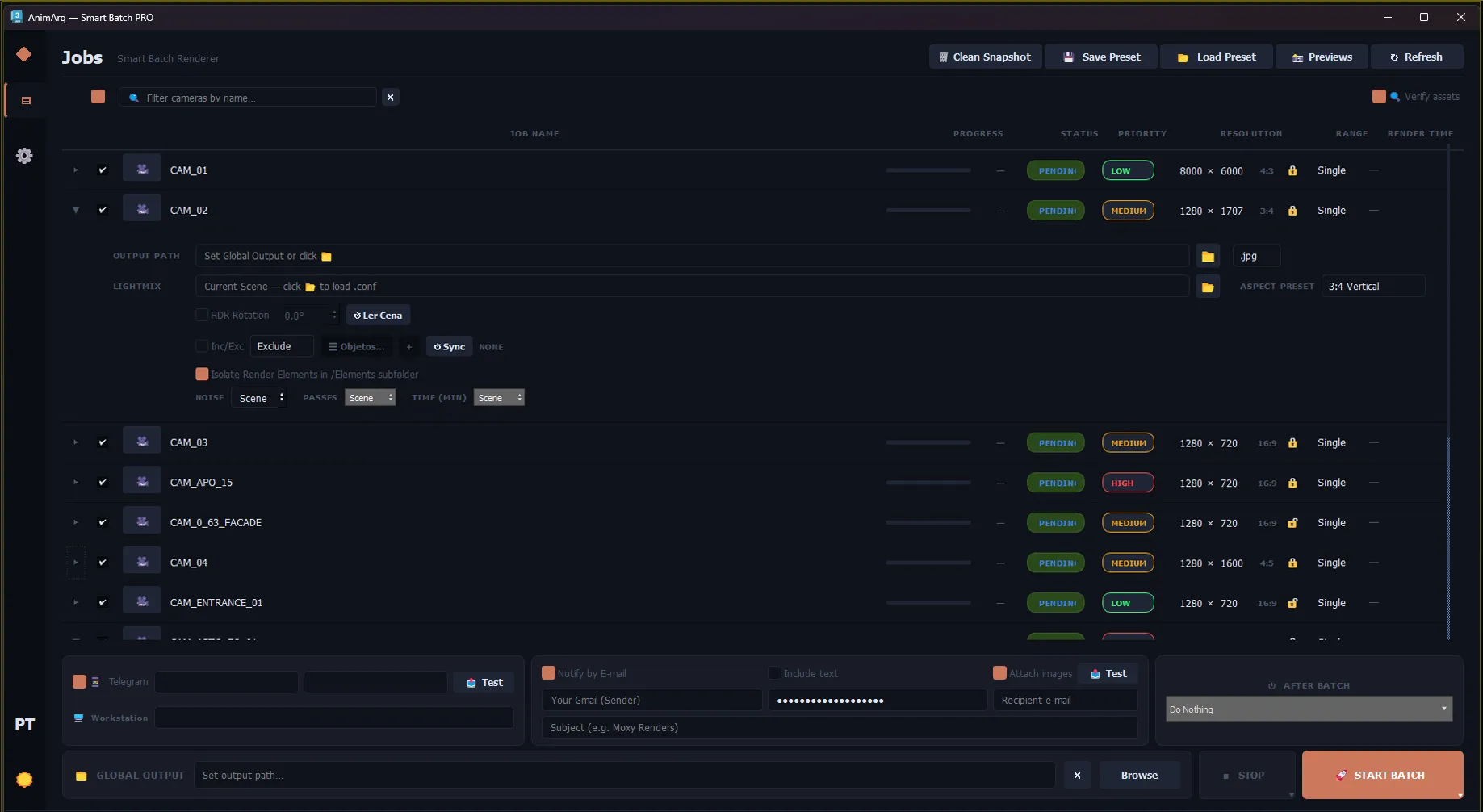
Replaces the native Batch with an independent queue manager. Operates in background, prevents silent crashes, and frees the 3ds Max interface so you can keep working.
A single error destroys your entire queue.
The native Batch locks the entire interface during rendering. You can’t edit, create, or tweak anything — the machine belongs to the software. And the chronic issue is lack of resilience: a RAM spike, a displacement failure, and the software freezes at 3 AM. No recovery. Just an undelivered render.
Total control. Camera by camera.
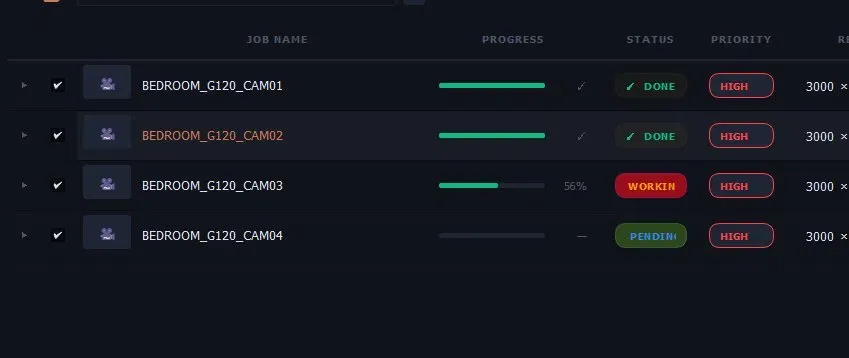
Track each job with visual progress, status, and priority, visible without opening Max: DONE — frame successfully rendered; WORKING — live progress bar; PENDING — waiting in queue. Real-time monitor via System Tray.
The return on your time.
Premium software isn’t about megahertz. It’s about what you do with the hours it gives back. Traditional pipeline: setup, PC locked — you do nothing — and crash. With Smart Batch PRO: start, espresso, play Factorio, walk the dog, watch a series, and a Telegram notification when the render completes.
What you get back.
8h+ of productive work recovered per project. 0 renders lost due to crashes. 100% of cameras checked before render. And peace of mind to sleep.
Every feature. A real problem solved.
Background Execution
AnimArq sends commands straight to the renderer’s core, bypassing the GUI. Open another Max instance and work in parallel without lag.
Watchdog Auto-Recovery
If Max closes abruptly, AnimArq kills the corrupted process, silently restarts, and resumes the batch. Typical downtime: 30–60s.
Telegram
Get automatic JPEG previews, error alerts, and confirmations straight to your phone. Go to sleep. The render will text you.
Asset Checker
Full sweep before each camera. Detects broken texture paths (CoronaBitmap) before rendering. Avoids waking up to black images.
Smart Snapshot
Before each camera renders, AnimArq freezes the scene. You can alter materials normally — the renderer always uses the frozen version.
Per-Camera Overrides
Individual resolution, passes, noise threshold, and output. 8K + 600 passes for the exterior? 1080p for the product? Each camera has its rule.
Global Output
Define a single destination folder. All cameras save automatically in the same place — no need to configure path by path.
Native Batch vs. Smart Batch PRO
| Native Batch | Smart Batch PRO | |
|---|---|---|
| Keep working during render | not available | available |
| Isolated render process | not available | available |
| Anti-crash watchdog with auto-recovery | not available | available |
| Queue resumes after crash | not available | available |
| Automatic snapshot per camera | not available | available |
| Telegram notification with JPEG preview | not available | available |
| Preventive Asset Checker | not available | available |
| Resolution/passes overrides per camera | not available | available |
| Real-time monitor via System Tray | not available | available |
| Global output — one folder for the queue | not available | available |
Already using auto-resolution scripts?
AnimArq reads any of them and applies the resolution directly — no reconfiguration needed.
animArq.CameraResolutionMode = #perCameraReads individual resolutions per camera and applies them automatically before rendering.on AspectListener changed ratioAnimArq uses the ratio values to calculate and apply the output resolution automatically.AnimArqCameraManager.scanScene()Reads the queue and settings, executing the batch while respecting your resolutions.Before you buy
No. It is a one-time payment: the licence is lifetime and keeps working with no renewal.
3ds Max 2022–2026, on 64-bit Windows.
Smart Batch PRO is currently focused and optimized for Corona Renderer — V-Ray support is on the roadmap. Floor Tiler, UnChamfer and Dynamic Line don’t depend on the renderer.
Drag the installer into a 3ds Max viewport (it may ask you to run Max as Administrator), restart Max and add the button from the “AnimArq” category in Customize.
Yes. If 3ds Max crashes, the Watchdog detects it, restarts the process and resumes the queue where it left off. Typical recovery: under 1 minute.
Not directly — raw render time depends on your hardware. Smart Batch saves your time by not paralyzing your machine and by preventing restarts caused by crashes.
Optimize your render queue.
Continuous workflow, without losing control of your machine and without surprises on delivery day.